Newspaper visual style
Vintage press photography. Study this look for your storyboard frames before planning motion and editing.
Storyboard opens a new project. This preset is not selected automatically.
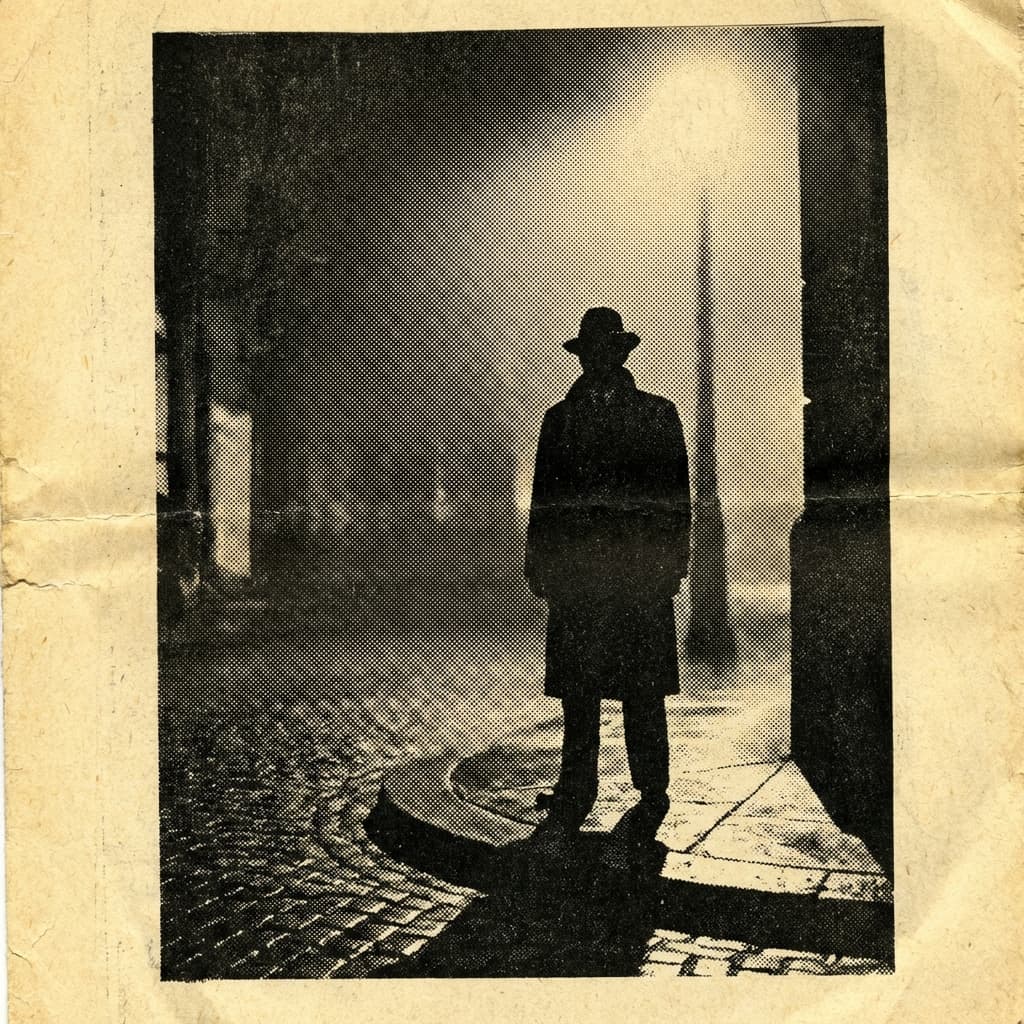
About the Newspaper style
Visual characteristics
Vintage newspaper photograph in 1950s press photography tradition. Visible halftone dot pattern from newsprint reproduction with high-contrast ink black and newsprint cream. Press photography composition with harsh vintage press-camera flash lighting at 45-degree angle. Slightly degraded image quality from decades of archival storage and handling, yellowed paper edges and fold creases. Wide-angle 35mm lens, chiaroscuro flash lighting, deep depth of field.
Color palette
Colors specified in the preset recipe, not a guarantee for every generated frame.
- #0a0a0a
- #f5f5dc
Adapt the preset recipe
Select and copy the recipe below as a starting point. In Storyboard, choose My styles, create a custom style and open Advanced mode. Adapt the wording to your scene and the editor's 1,000-character limit; a Studio preset is not imported automatically. Camera and film references describe the intended look, not equipment used to create the preview or guaranteed animation.
Vintage newspaper photograph in 1950s press photography tradition. Visible halftone dot pattern from newsprint reproduction with high-contrast ink black (#0A0A0A) and newsprint cream (#F5F5DC). Press photography composition with harsh vintage press-camera flash lighting at 45-degree angle. Slightly degraded image quality from decades of archival storage and handling, yellowed paper edges and fold creases. Wide-angle 35mm lens, chiaroscuro flash lighting, deep depth of field.
Plan shots in the Newspaper look
Step 1: Study the visual recipe
Compare the Newspaper still preview with the visual notes below. Choose which lighting, palette and framing cues belong in your shot list.
Step 2: Build your storyboard
Open a new Storyboard, add your script and character references, then choose its style separately. To adapt this recipe, paste it into a custom style in Advanced mode.
Step 3: Review before video
Review the generated frames for continuity. A still does not specify motion, pacing or audio; plan those as separate decisions for your video.

Plan Your Newspaper Storyboard
Use the Newspaper notes as a visual brief. Storyboard opens a new project; it does not automatically select this Studio preset.