Silver Guardian Spirit scene
Protective magic charm. Use this composition as a reference for a storyboard beat, then plan the motion around it.
Storyboard opens a new project, not a preselected iconic scene.
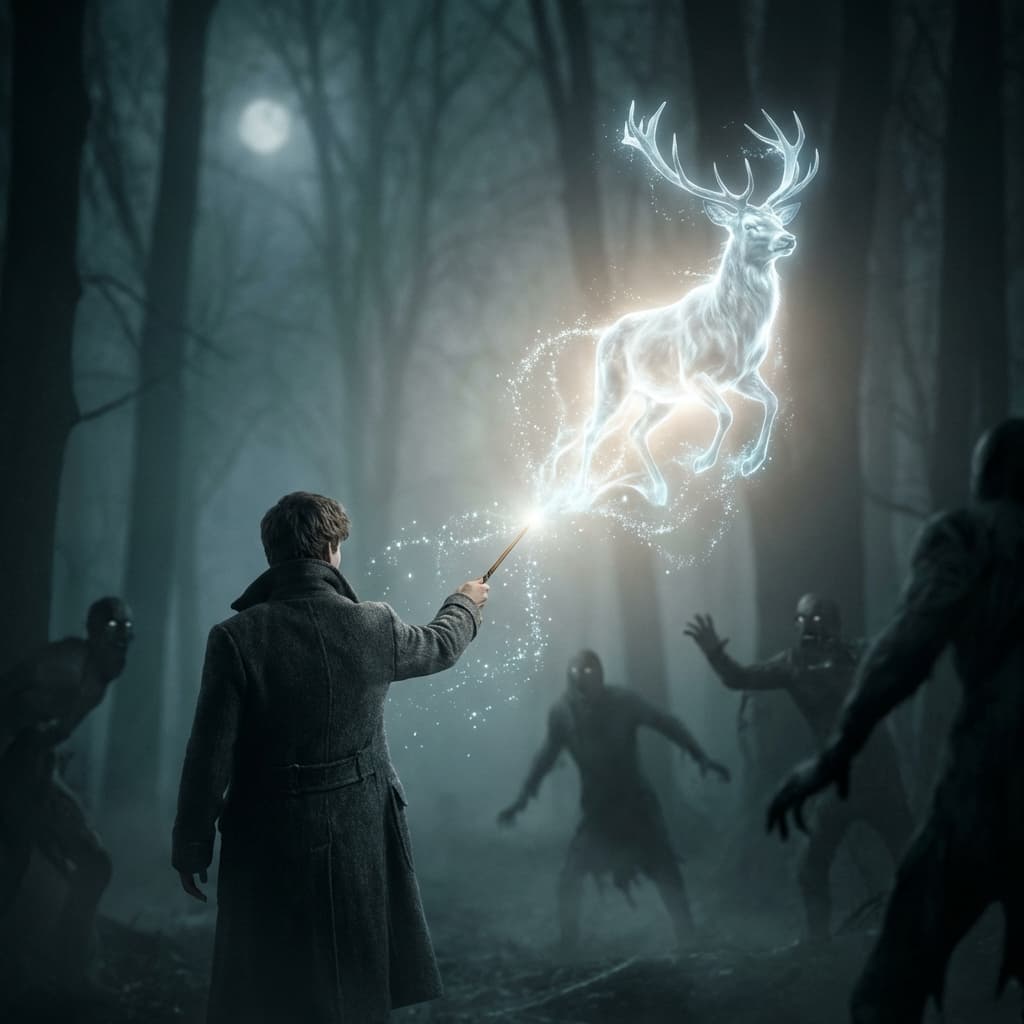
Recreating Silver Guardian Spirit
Visual composition
In 2004 guardian-spirit style: a luminous silver stag erupts from the wand tip, ethereal particles of light blue-white trailing from its form. The spectral guardian rendered as translucent glowing plasma with internal light source, particle effects creating a misty aurora. Dark teal-gray wraiths scatter from the blazing silver light. Desaturated blue-grey color grade, the warm silver guardian the only saturated element. Practical light-sword technique with VFX enhancement, 35mm.
Color palette
Colors specified in the preset recipe, not a guarantee for every generated frame.
- #c0c0c0
- #e0ffff
- #2f4f4f
Adapt the scene recipe
Select and copy this recipe as a shot-planning reference. Adapt its staging and lighting in your scene prompt, or create a custom style in Storyboard's My styles tab using Advanced mode. The custom-style editor has a 1,000-character limit. Camera and lens references describe the intended aesthetic, not how this still was photographed or a promise of video output.
In 2004 guardian-spirit style: a luminous silver (#C0C0C0) stag erupts from the wand tip, ethereal particles of light blue-white (#E0FFFF) trailing from its form. The spectral guardian rendered as translucent glowing plasma with internal light source, particle effects creating a misty aurora. Dark teal-gray (#2F4F4F) wraiths scatter from the blazing silver light. Desaturated blue-grey color grade, the warm silver guardian the only saturated element. Practical light-sword technique with VFX enhancement, 35mm.
These presets are visual references, not footage from any production. Consider rights to recognizable characters, artworks and likenesses before publishing.
Plan a storyboard around Silver Guardian Spirit
Step 1: Break down the frame
Read the Silver Guardian Spirit recipe and compare its subject placement, light and setting with the still preview. Decide which cues your own scene should preserve.
Step 2: Place it in your story
Create a Storyboard with your script and references. Adapt the recipe in a custom style or scene prompt; this catalog link does not preselect the iconic scene.
Step 3: Plan the adjacent shots
Review the frame alongside the shots before and after it. Specify movement, timing and sound separately rather than treating the still preview as a finished video.
Plan Your Silver Guardian Spirit Storyboard
Plan the shots around Silver Guardian Spirit in a new Storyboard, or explore the scene in Studio for a single-image task. The two workflows are separate.