Tatami-Height Stillness visual style
Japanese minimalism. Study this look for your storyboard frames before planning motion and editing.
Storyboard opens a new project. This preset is not selected automatically.
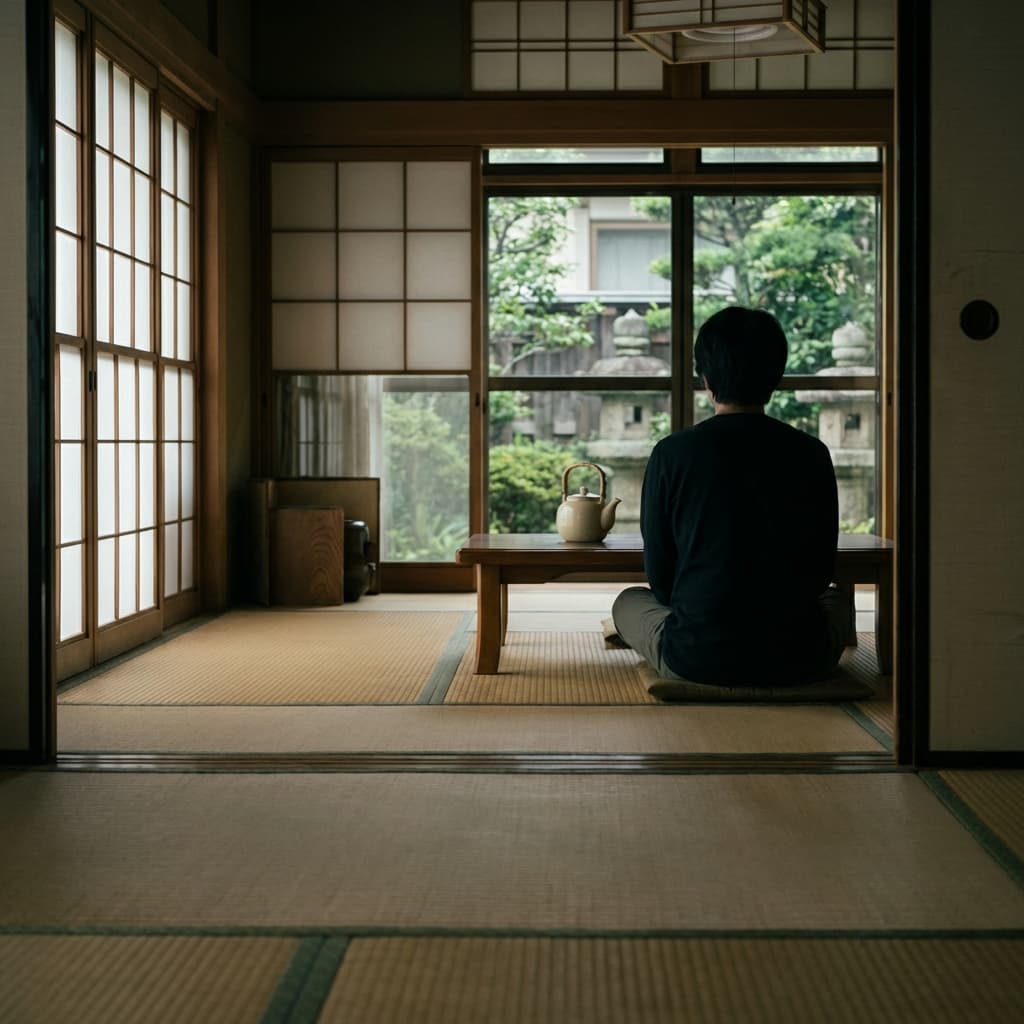
About the Tatami-Height Stillness style
Visual characteristics
Tatami-height stillness from golden-age Japanese family dramas. Signature tatami-mat camera height (3 feet off ground) with 50mm lens. Pillow shots: empty spaces, household objects, tea kettles in cream. Color palette: tatami tan, shoji paper white, garden green. 1.37:1 Academy with static camera and 180° edit rule. Precise symmetrical framing, generational family meditation. Stillness and silence between dialogue, the "mu" of cinema.
Color palette
Colors specified in the preset recipe, not a guarantee for every generated frame.
- #fffdd0
- #d2b48c
- #fffaf0
- #228b22
Adapt the preset recipe
Select and copy the recipe below as a starting point. In Storyboard, choose My styles, create a custom style and open Advanced mode. Adapt the wording to your scene and the editor's 1,000-character limit; a Studio preset is not imported automatically. Camera and film references describe the intended look, not equipment used to create the preview or guaranteed animation.
Transform the scene into tatami-height stillness from golden-age Japanese family dramas. Signature tatami-mat camera height (3 feet off ground) with 50mm lens. Pillow shots: empty spaces, household objects, tea kettles in cream (#FFFDD0). Color palette: tatami tan (#D2B48C), shoji paper white (#FFFAF0), garden green (#228B22). 1.37:1 Academy with static camera and 180° edit rule. Precise symmetrical framing, generational family meditation. Stillness and silence between dialogue, the "mu" of cinema.
Plan shots in the Tatami-Height Stillness look
Step 1: Study the visual recipe
Compare the Tatami-Height Stillness still preview with the visual notes below. Choose which lighting, palette and framing cues belong in your shot list.
Step 2: Build your storyboard
Open a new Storyboard, add your script and character references, then choose its style separately. To adapt this recipe, paste it into a custom style in Advanced mode.
Step 3: Review before video
Review the generated frames for continuity. A still does not specify motion, pacing or audio; plan those as separate decisions for your video.



Plan Your Tatami-Height Stillness Storyboard
Use the Tatami-Height Stillness notes as a visual brief. Storyboard opens a new project; it does not automatically select this Studio preset.