The Scream scene
Munch, existential terror. Use this composition as a reference for a storyboard beat, then plan the motion around it.
Storyboard opens a new project, not a preselected iconic scene.
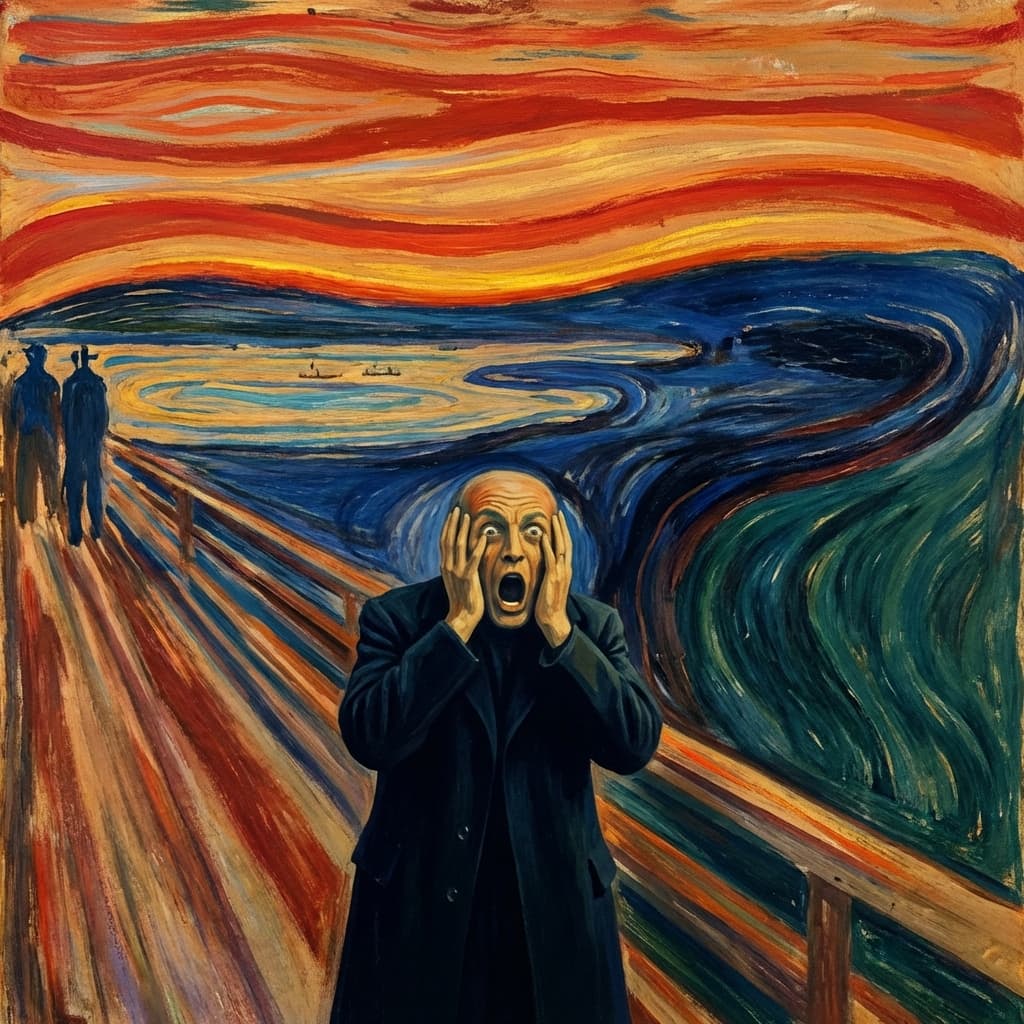
Recreating The Scream
Visual composition
Studio Expressionist style of an 1893 Norwegian oil-pastel-and-tempera masterpiece: the figure on a fjord bridge, hands pressed to oval face in primal terror, mouth open in a silent howl. The sky blazes with violent bands of blood-red and fiery orange, swirling in waves that echo inner anguish. The Oslofjord and hills warp in sickly greens and deep blues, two distant silhouettes walking obliviously. The entire composition vibrates with psychological intensity, wavy distorted lines and non-naturalistic perspective making color itself become a scream. Cardboard support with oil and pastel layers, visible grain texture, natural Norwegian fjord light reimagined through existential anxiety.
Color palette
Colors specified in the preset recipe, not a guarantee for every generated frame.
- #8b0000
- #ff4500
- #556b2f
- #191970
Adapt the scene recipe
Select and copy this recipe as a shot-planning reference. Adapt its staging and lighting in your scene prompt, or create a custom style in Storyboard's My styles tab using Advanced mode. The custom-style editor has a 1,000-character limit. Camera and lens references describe the intended aesthetic, not how this still was photographed or a promise of video output.
Studio Expressionist style of an 1893 Norwegian oil-pastel-and-tempera masterpiece: the figure on a fjord bridge, hands pressed to oval face in primal terror, mouth open in a silent howl. The sky blazes with violent bands of blood-red (#8B0000) and fiery orange (#FF4500), swirling in waves that echo inner anguish. The Oslofjord and hills warp in sickly greens (#556B2F) and deep blues (#191970), two distant silhouettes walking obliviously. The entire composition vibrates with psychological intensity, wavy distorted lines and non-naturalistic perspective making color itself become a scream. Cardboard support with oil and pastel layers, visible grain texture, natural Norwegian fjord light reimagined through existential anxiety.
These presets are visual references, not footage from any production. Consider rights to recognizable characters, artworks and likenesses before publishing.
Plan a storyboard around The Scream
Step 1: Break down the frame
Read the The Scream recipe and compare its subject placement, light and setting with the still preview. Decide which cues your own scene should preserve.
Step 2: Place it in your story
Create a Storyboard with your script and references. Adapt the recipe in a custom style or scene prompt; this catalog link does not preselect the iconic scene.
Step 3: Plan the adjacent shots
Review the frame alongside the shots before and after it. Specify movement, timing and sound separately rather than treating the still preview as a finished video.
Plan Your The Scream Storyboard
Plan the shots around The Scream in a new Storyboard, or explore the scene in Studio for a single-image task. The two workflows are separate.